
Prerequisites
This tutorial follows my previous post on handling Rails API authentication with React frontend. You can follow along without it, but I assume:
- You’re using Ruby on Rails with a React frontend
- You’ve implemented cookie‑based authentication
How it works
- After login, the browser stores a secure cookie that’s automatically appended to every client request.
- An attacker’s site can forge requests on the user’s behalf, and they’ll be authenticated.
Attack vector:
Another site issues requests to your site while pretending to be the user.
Why CORS (SOP) doesn’t stop CSRF
If you followed my previous tutorial, you’re using SOP (Same-Origin Policy) behavior via a proxy — we didn’t configure CORS in Rails but instead used a development proxy to avoid CORS issues.
That setup does not protect against CSRF.
Here’s why:
- CORS (Cross-Origin Resource Sharing) controls who can read responses from cross-origin requests.
- It does not prevent the browser from sending the request — it only stops JavaScript from reading the response unless the server allows it.
- CSRF doesn’t rely on reading the response — it just needs the browser to send a valid request with cookies.
- Therefore, CORS doesn’t mitigate CSRF, even if SOP is enforced.
Solution: Add another validation vector
- Generate a CSRF token on the server
- Return it at authentication
- Include the CSRF token in the request body or a custom header for every state‑changing request
- (Alternatively, generate it client‑side in JavaScript)
⚠️ Warning:
Do not store the CSRF token in local storage.
Rails 8 + React: Implementation
1. Generate the CSRF token on the server
We configure Rails to generate a CSRF token and send it in a cookie, so the frontend can read and include it in future requests. This is required for Rails to validate non-GET requests.
In app/controllers/application_controller.rb, include cookies and forgery protection, then set the CSRF cookie:
class ApplicationController < ActionController::API
  include ActionController::Cookies
  include ActionController::RequestForgeryProtection

  protect_from_forgery with: :exception
  before_action :set_csrf_cookie

  private

  def set_csrf_cookie
    cookies["CSRF-TOKEN"] = form_authenticity_token
  end
end
To add extra security:
def set_csrf_cookie
	cookies["CSRF-TOKEN"] = {
		 value: form_authenticity_token,
		 secure: true,
		 same_site: :strict
	 }
end
protect_from_forgery with: :exceptiontells Rails to verify theX-CSRF-Tokenheader against the session token. Withoutset_csrf_cookie, every non‑GET request will fail.
2. Why it’s safe
A malicious site cannot read your CSRF cookie (Same‑Origin Policy):
-
HttpOnly cookies: JS can’t access them.
-
SameSite=Lax/Strict: not sent in cross‑origin requests.
-
Cross‑origin JS: cannot read another domain’s cookies.
Verify CSRF token
Use CSRF token in React
Before we send the CSRF token in a header from the client, I have a question first:
Have you seen any error when authenticating a user?
Probably not — because CSRF protects state-changing operations like creating, updating, or deleting data (e.g., form submissions) from being executed by third parties.
So does it prevent registration? → Yes
Try it out before adding the CSRF token.
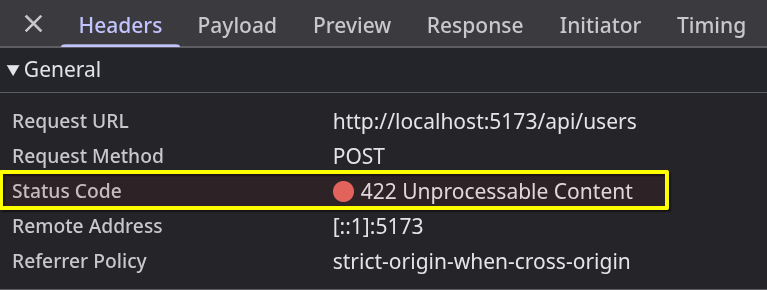
Now it reacts correctly — but we didn’t add any error handling yet.
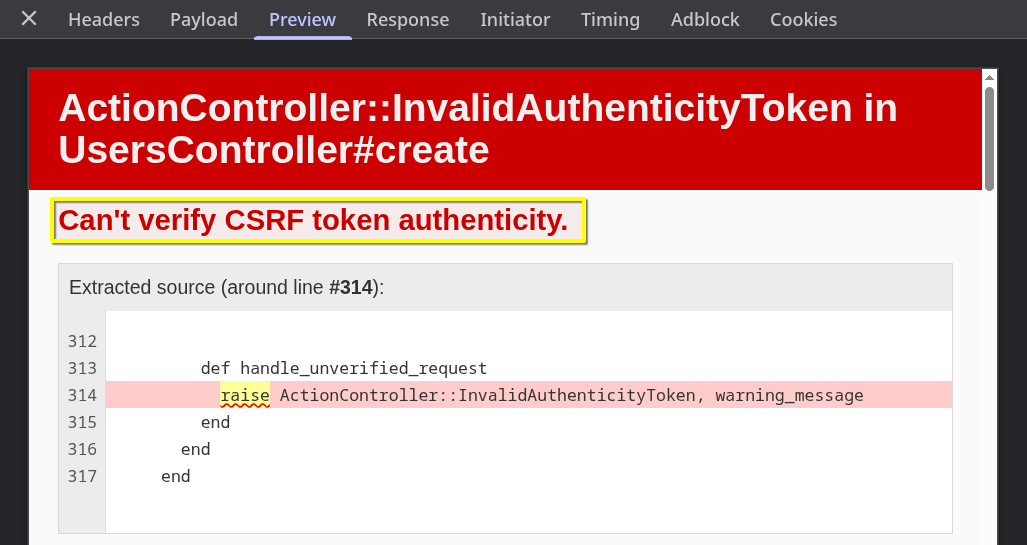
So the response from the server will probably be gibberish.
Fortunately, Rails helps us out by providing useful error info in the preview panel:
Improve error handling
class ApplicationController < ActionController::API
  # ...
  rescue_from ActionController::InvalidAuthenticityToken do
    render json: { error: "Invalid CSRF token." }, status: :unauthorized
  end
  # ...
end
We do this because our frontend can handle JSON errors much easier than parsing a full HTML error page.
Using CSRF-token in react
1. Create a CSRF‑token endpoint
Generate a controller:
rails generate controller CsrfTokens
Add a route in config/routes.rb:
scope :api do
	get "csrf-token", to: "csrf_tokens#index"
	# ...
end
Implement the action in app/controllers/csrf_tokens_controller.rb:
class CsrfTokensController < ApplicationController
	skip_before_action :authenticate_user

	def index
		cookies["CSRF-TOKEN"] = form_authenticity_token
		render json: {
				message: "CSRF token generated successfully."
			}, status: :ok
	end
end
2. Fetch the token in React
The frontend must read the CSRF token from the cookie and attach it to requests.
import { useState, useEffect } from "react";
import axios from "../axios";

export default function Register() {
  const [token, setToken] = useState("");

  function getCookie(name: string) {
    const value = `; ${document.cookie}`;
    const parts = value.split(`; ${name}=`);
    return parts.length === 2 ? parts.pop()?.split(";").shift() : "";
  }

  useEffect(() => {
    axios.get("api/csrf-token", { withCredentials: true })
      .then(() => {
        setToken(getCookie("CSRF-TOKEN") || "");
      });
  }, []);

  function handleRegistration() {
    axios.post(
      "api/users",
      { email, password },
      { headers: { "X-CSRF-Token": token } }
    );
  }

  return (
    // your form TSX
  );
}
3. Better solution: Configure Axios defaults
While this manual setup works, there’s a better way using Axios defaults.
Create src/axios.ts:
import axios from "axios";

axios.defaults.xsrfCookieName = "CSRF-TOKEN";
axios.defaults.xsrfHeaderName = "X-CSRF-Token";
axios.defaults.withCredentials = true;

export default axios;
Then in your component:
import axios from "../axios";

export default function Register() {
  useEffect(() => {
    axios.get("api/csrf-token");
  }, []);

  function handleRegistration() {
    axios.post("api/users", { email, password });
  }

  return (
    // your form TSX
  );
}
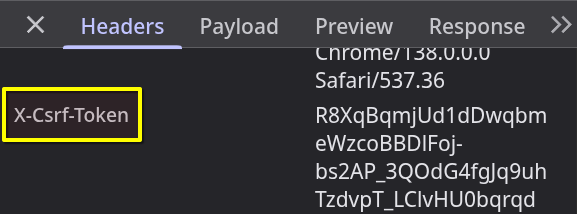
Note: Axios will now handle storing and sending the CSRF token automatically.
Fun facts
- Rails CSRF tokens are valid only for the session they were generated from.
- Rails does not store CSRF tokens; it generates them based on the session.
Conclusion
You’ve learnt how CSRF works, why CORS alone doesn’t prevent it, and how to implement CSRF protection in Rails 8 with a React frontend.
If you want to go deeper into real-world system design, I highly recommend the audiobook version of Designing Data-Intensive Applications – it’s packed with insights on building reliable, scalable, and maintainable systems.
👉 You can get it FREE with a 30-day Audible trial here: https://amzn.to/4eTTuFZ 🎧 You can cancel anytime, keep the book, and it won’t cost you a thing. Rails with a React frontend By using that link, you’ll support my work at no extra cost to you — and you’ll massively level up your backend engineering skills just by listening.