
Have you ever run a user test where you were almost tearing your hair out because the user couldn’t figure out how to use your app? Have you ever added a new feature and taught it to users up front, only to find they forgot how to use it by the time they actually needed it?
This is a very common situation in the SaaS world. In this article, I’ll show you how we solved this problem in my Windows CLI learning app by switching from upfront onboarding to Just-in-Time learning.
The Problem: Upfront Onboarding Overload
The app I’m building is designed to teach people how to use the Windows Terminal. Since it’s a free web app, we attract a lot of users who have never used a command-line interface before.
One of the issues that heavily impacted user retention was simple spelling mistakes. When users made a typo in a complex command, they had to rewrite the entire thing from scratch. It was incredibly frustrating—so much so that almost half of the users abandoned the more complicated lessons entirely.
I spent a lot of time thinking about how to solve this. Initially, I tried introducing helpful terminal shortcuts at the beginning of the course. However, most users simply skipped the intro or quickly forgot the shortcuts. Learning a new app is challenging enough; overwhelming the user with supplementary information right at the start is often counterproductive.
The Solution: Just-in-Time Tips
Instead of trying to teach users all the tricks before they even understand the basics, I decided to show them the shortcuts exactly when they need them.
Now, the first time a user makes a typo in a command, the app pauses and displays a specific tip (like using the up arrow to recall the previous command). It explains the trick in context. The next time they make a mistake, they already know how to correct it easily, entirely removing the frustration factor.
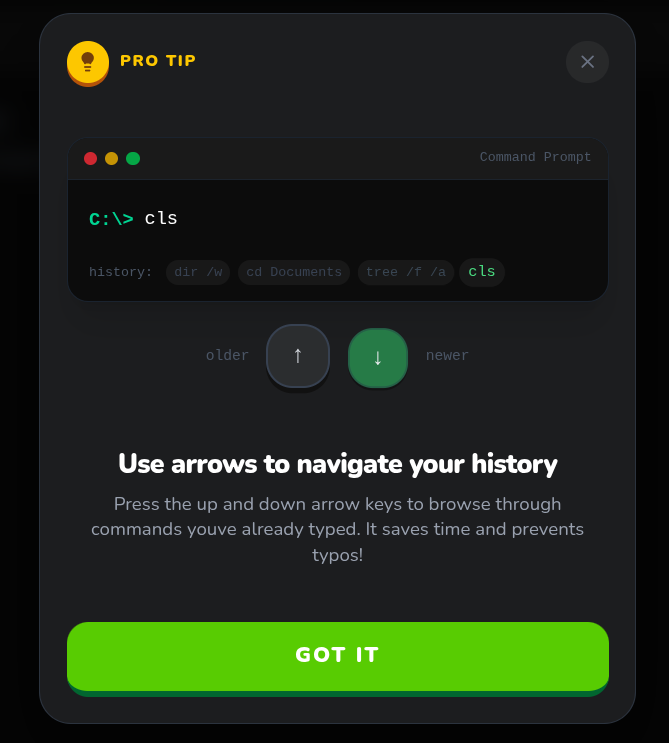
See It in Action
This is what contextual, just-in-time education looks like in practice. By the time the user makes a mistake, they have the exact context needed to absorb the new information.
You can try it out yourself and see the flow in action in my app.