Overview
Simply asking users to sign up isn’t just annoying—it could be costing you 45% of your potential customers, according to the famous $300 Million Button case study. Even worse, this friction is amplified on small screens, where abandonment rates spike to 86% for mobile users who simply refuse to type lengthy forms, according to recent abandonment data.
By the end of this article, you’ll have a flow where users can build value first and sign up second, without losing their data. So you can avoid this huge loss of potential customers.
What is Lazy Registration?
Lazy registration (or “Just-in-Time” registration) is a strategy where you defer the sign-up process until the absolute last moment. Instead of blocking users with a login screen immediately, you allow them to interact with your application, create content, or customize their experience as an “anonymous” user.
Only when they want to save their work permanently, access cross-device features, or perform a sensitive action do you ask them to create an account. This builds trust and investment before asking for commitment.
How to Implement Lazy Registration in Firebase
0. Prerequisites
Before we start, you need a Firebase project. If you haven’t created one yet, head over to the Firebase Console and set one up. Google also has a helpful youtube video that walks you through the process.
You will also need to enable Authentication in your Firebase console. Go to the Build > Authentication tab and get started.
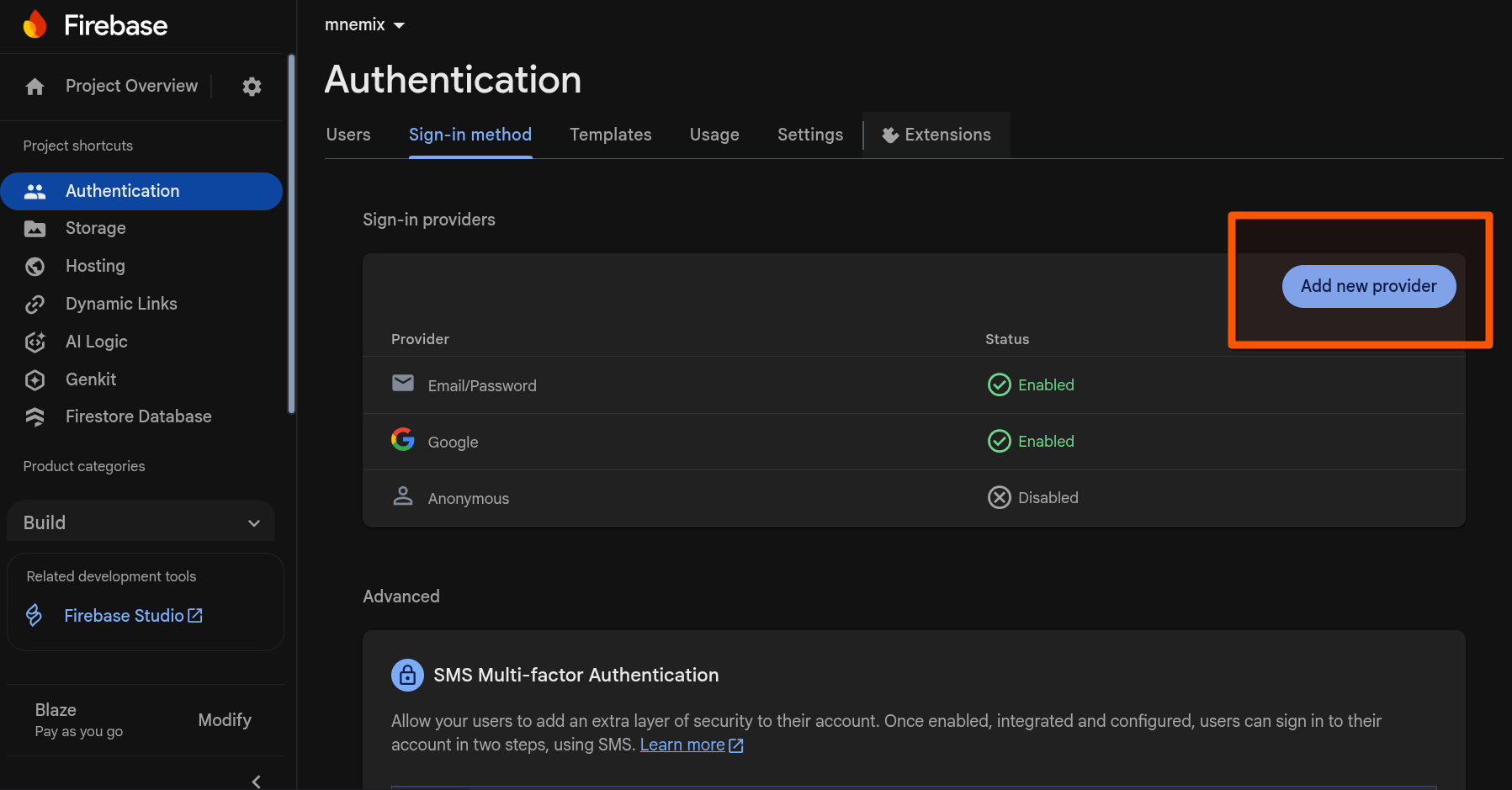
Make sure to enable Anonymous sign-in providers as well as any other providers you plan to use (like Google, Email/Password, etc.).
1. Storing data for anonymous users
The core of lazy registration in Firebase is signInAnonymously. This creates a temporary user session that persists across page reloads, allowing you to treat the user as “logged in” without any credentials.
import { getAuth, signInAnonymously } from "firebase/auth";

const auth = getAuth();
await signInAnonymously(auth);
Once signed in, you can listen to the auth state just like any other user. If you are using React, the useAuthState hook from react-firebase-hooks is fantastic for this.
import { getAuth, onAuthStateChanged } from "firebase/auth";

onAuthStateChanged(auth, (user) => {
    if (user) {
        // User is signed in.
        // For anonymous users, user.isAnonymous will be true
        const uid = user.uid;
        console.log("User is logged in:", uid, "Is anonymous:", user.isAnonymous);
    } else {
        // User is signed out
    }
});
See the Firebase User documentation for all available properties.
1.1 Managing Anonymous Users in Firestore
By default, anonymous accounts persist until the user signs out. However, if they never convert to a permanent account, you might end up with a lot of stale user records.
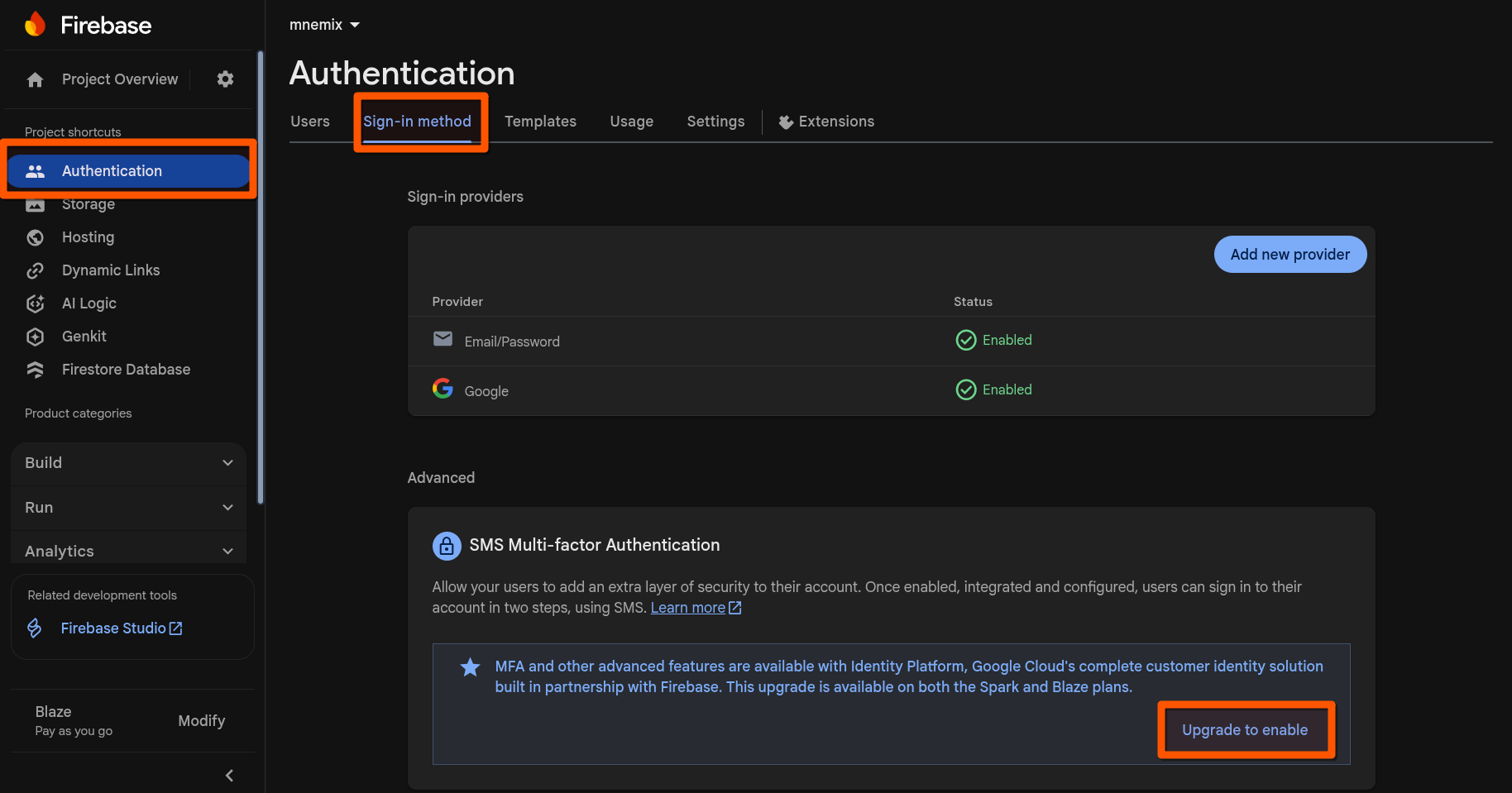
To handle this, we can leverage Google Cloud’s Identity Platform. This offers advanced features, including the ability to automatically delete anonymous users who haven’t been active for a set period (e.g., 30 days).
First, you’ll need to upgrade to Identity Platform in the Firebase Console:
Once enabled, you can configure the automatic deletion policy for anonymous users:
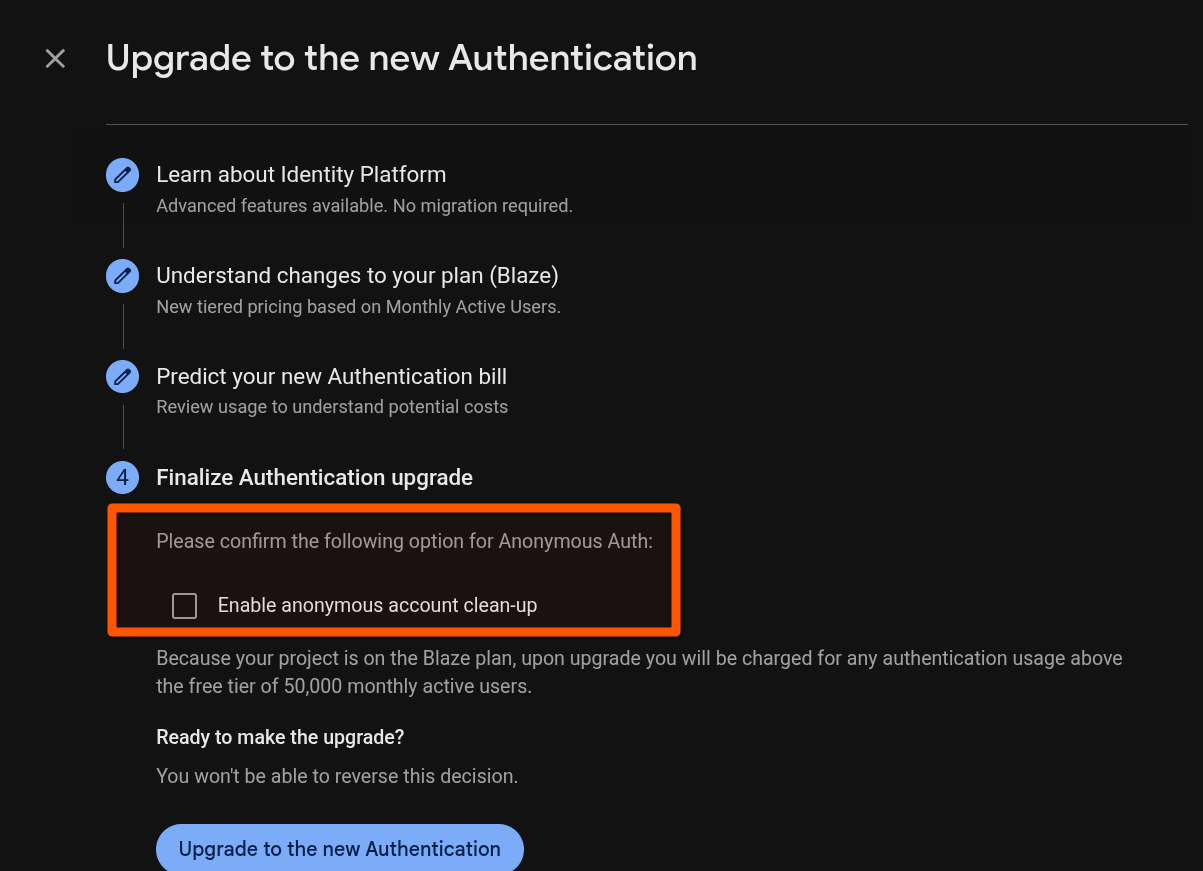
This keeps your user base clean without manual maintenance.
2. Linking anonymous users to a permanent account
The magic happens when the user decides to sign up. You don’t want them to start over; you want to convert their anonymous account into a permanent one. Firebase makes this easy with linkWithCredential.
This effectively “upgrades” the current anonymous user to a standard user (e.g., Email/Password, Google, etc.), preserving their UID and any data associated with it in Firestore.
Here is an example using Email and Password:
import { getAuth, linkWithCredential, EmailAuthProvider } from "firebase/auth";

const auth = getAuth();
const credential = EmailAuthProvider.credential(email, password);

try {
    const user = auth.currentUser;
    const result = await linkWithCredential(user, credential);
    const user = result.user;
    console.log("Anonymous account successfully upgraded!", user);
} catch (error) {
    console.error("Error upgrading account", error);
    // Handle errors like 'credential-already-in-use' if the email is already taken
}
After this step, user.isAnonymous will be false. The user keeps all their progress, but now they can log in from other devices and their account is secure.
Lazy registration in action
If you want to experience how detailed implementations of these patterns work, check out my app teaching windows command line. I’m actively developing it to include a hacking course with an interactive terminal, using these exact principles to let students start learning immediately.
Conclusion
Lazy registration is a powerful pattern to boost conversion rates. By letting users engage first and register later, you remove barriers to entry and prove your value proposition upfront. With Firebase’s signInAnonymously and linkWithCredential, implementing this flow is straightforward and robust.